Release Notes
Commerce

| Commerce
25 August 2026
🎉 New Features or Settings
- Filter Blend inventory by Profile Group
- You can now filter the Blend inventory overview by Profile Group, making it easier to calculate net requirements for blends that use a specific profile group. The filter is saved in the URL, so it persists on reload.
✨ Improvements to Existing Features or Settings
- Duplicate rows no longer block CSV raw materials imports
- Files with duplicate rows now import successfully instead of being rejected. Duplicate names and SKUs are called out by name in the warning banner on the Raw Materials overview afterward, so you can review them.
- CSV import templates match your regional format
- Downloaded CSV templates for raw materials and orders now use the list separator that matches your regional format, so the file opens directly as columns in Excel or Numbers with no manual Text-to-Columns step.
- Confirmation step when archiving or unarchiving a product or bundle
- Archiving or unarchiving a product or product bundle now shows a confirmation modal first, so you know upfront that the change won’t apply to its variants automatically.
- Clearer error when archiving a profile group still used in a blend
- Trying to archive a profile group that’s still part of a blend profile now shows a clear error explaining which blend profile(s) it belongs to, so you can remove it there first.
🛠 Fixed Issues
- “Execute plans” button no longer hidden on desktop
- The “Execute plans” button in the Packaging tab is now always visible in the section header on desktop, instead of sometimes being pushed into the overflow menu.
- Packaging requirements text restored for accounts without Resource Planning
- The paragraph showing how many labels and packages a packaging run needs is back in the “Package” section for accounts without the Resource Planning add-on. Accounts with the add-on continue to see this in Material requirements instead.
24 August 2026
🎉 New Features or Settings
- Bulk import raw materials via CSV
- Upload your full raw materials catalogue — packaging, labels, boxes, flavourings, and more — in one CSV file instead of adding items one at a time. Download the provided template or import your own, map your columns, and imported items are ready to use immediately, no review step needed. Rows with an unrecognized item type are still created (as “Other”) and flagged afterward so you can double-check them.
CSV Raw Materials Import is part of the Resource Planning add-on. Group administrators have full access by default and can grant access to individual team members from account settings.
18 August 2026
✨ Improvements to Existing Features or Settings
- Execute packaging plans for just one order fulfillment
- The “Execute plans” button in the Packaging tab now offers two options: All plans (unchanged) and For this OF only, which executes just the plans created for that order fulfillment — so you can process one OF at a time without touching other open plans for the same product.
🛠 Fixed Issues
- Sync button no longer shown without a shop integration
- The Sync button is now hidden on the Products and Bundles overviews when there’s no shop integration configured, matching the Orders overview. Clicking it previously showed an error.
11 August 2026
🎉 New Features or Settings
- Map CSV columns when importing orders
- You can now map the columns in your CSV file to Cropster’s order-import fields before importing. Cropster automatically matches recognisable headers and shows sample values from your file, while allowing you to adjust the mapping manually. Select the date format separately and resolve any missing or duplicate mappings before importing. Your mapping is saved in the browser for future uploads, making it easier to import files from different systems without reformatting them first.
🛠 Fixed Issues
- Restricted machines selected first for roast schedules
- When you add a roast schedule from Loose Inventory or Order Fulfilment, the system now preselects the machine associated with the profile instead of the first available machine.
04 August 2026
🎉 New Features or Settings
- Import orders from CSV
- You can now import orders by uploading a CSV file from the Orders overview. Download the template, add order numbers, dates, SKUs, quantities, customers, and customer types, then upload the file to create orders in bulk. The import supports multi-item orders and shows clear feedback for validation errors and items that need review. Coming soon: Column mapping, so you can select columns from your CSV files and map them to ours more easily.
- Order source visibility
- The Orders overview and order detail page now show where each order came from, such as a connected shop, manual creation, CSV import, or API import. A new Source filter lets you quickly narrow the order list by one or more sources.
✨ Improvements to Existing Features or Settings
- New 7.5 kg unit
- A new 7.5 kg weight unit is now available for orders and product variants.
🛠 Fixed Issues
- Shop sync button label updated
- The button on the Orders overview has been renamed from “Synchronize” to “Shop sync”.
07 July 2026
🎉 New Features or Settings
- Bill of materials (BOM)
- Define which raw materials are needed to produce one unit of a finished good. For example, a BOM for a Colombia, 250g retail bag of whole beans might list one bag, one label, one valve, and one tin tie. A new Bill of materials page under Commerce gives you a filterable overview of all your BOMs. Create, edit, copy, and archive BOMs directly from the overview. Copy an existing BOM to quickly set up a similar component list for a different product variant.
- Bill of materials is part of the Advanced Planning add-on. Group administrators have full access by default and can grant access to individual team members from account settings.
- Added new units: 25 kg and 6.25 kg
- A new 25 kg and 6.25 kg weight unit is now available for your orders and product variants.
- A new 25 kg and 6.25 kg weight unit is now available for your orders and product variants.
- ✨ Improvements to Existing Features or Settings
- Notes for adjustments of Raw material
- They changed from required to optional.
- Notes for adjustments of Raw material
09 June 2026
What’s new
Cropster Commerce now includes a Raw Materials module — a dedicated place to catalogue and track your non-coffee consumables: packaging bags, labels, valves, tin ties, cans, flavourings, and any other materials that go into your finished goods.
This is the first step towards fully integrated inventory management. You can build your complete catalogue and record opening stock balances so the system is accurate from day one.
What you can do
Build your raw materials catalogue
Create an item for every consumable your roastery uses. Each item can include:
- Name and item type — bag, label, box, can, flavour, or other
- SKU — a unique identifier for the material
- Base unit — pieces, kg, g, lb, oz, l, or ml
- Supplier — linked to your existing Supply Network contacts
- Reorder point — the stock level at which you want a reminder to reorder
- Lead time — how many days it typically takes to receive a delivery
Record opening balances
When you add an item, enter the quantity currently on hand. This records your starting inventory immediately — no need to wait until your next delivery before the catalogue is useful.
View and manage your catalogue
A filterable, sortable overview shows all your raw materials at a glance. Filter by name, SKU, item type, supplier, or status (active or archived). Each item has a detail page showing its general information and current stock.
Supplier integration
Suppliers are pulled from your existing Supply Network contacts. If a supplier isn’t listed yet, type their name and a new Vendor entry is created automatically — no need to leave the page.
Archive items, never delete
When a raw material is no longer in use, archive it. Archived items stay in the system for historical reference and can be unarchived at any time if you start using them again.
12 May 2026
✨ Improvements to Existing Features or Settings
- Blending requirement tooltip on roasting tab
- The roasting tab in order fulfillment now shows a tooltip indicating how much of the net requirement comes from blending needs. This gives you better visibility into your production requirements at a glance.
- Archived products excluded from net requirement calculations
- Archived profile groups and blend profiles are now excluded from net requirement calculations across loose and blend inventory, so the values you see reflect only your active products.
- 20 kg order unit
- A new 20 kg weight unit is now available for your orders and product variants.
🛠 Fixed Issues
- Rounding errors in net requirement values fixed
- Fixed rounding inconsistencies for net requirement values on the roasting and blending tabs when using pounds (lbs). Net requirements now correctly display as zero after scheduling roasts or creating blends.
- Duplicate packaging plans in order fulfillment
- Fixed a bug where executing packaging plans through the order fulfillment tab could create duplicate plans. Executing from the packaging plans overview was not affected.
28 Apr 2026
✨ Improvements to Existing Features or Settings
- See Minimum Stock Levels directly in Profile Groups
- You can now see the Minimum Stock Level right in the Profile Group overview and detail pages. This makes it easier to spot low‑stock risks without leaving your current view.
- Packaging execution only shows what you actually need to pack
- During packaging execution, you’ll now only see the product variants that are relevant for the selected order fulfillment. This helps you focus on what needs to be packed now and avoids accidentally packaging products too early.
🛠 Fixed Issues
- More reliable duplicate External ID check
- We fixed an issue where the duplicate External ID check during product ingestion didn’t always work as expected. The system now reliably flags duplicates to help keep your product data clean.
- No more “Invalid.data” error when creating post‑roast blends
- An error that blocked the creation of post‑roast blends has been resolved, so you can create blends without interruption.
- Smoother validation on the Edit Product page
- Frontend validation on the Edit Product page has been improved to prevent confusing or incorrect validation messages and to make editing products more straightforward.
- Profile Groups now load correctly when end weight is 0
- We fixed an issue where Profile Groups sometimes didn’t load in roast schedules if the end weight was set to 0. These profiles now load as expected.
- Page header restored on Post‑Roast Blend Profiles
- The missing page header on the Post‑Roast Blend Profiles page has been restored, so the layout is consistent with other pages.
22 Apr 2026
✨ Improvements to Existing Features or Settings
- Filter packaging plans by product
- The packaging plans overview now includes a product filter. Quickly narrow down the list to one or multiple specific products so you can focus only on the plans that matter for your current production run.
- Order Fulfillment: All Data Visible (No Pagination)
- We removed pagination across all four tabs (Pick list, Packaging, Roasting, Blending) so you can view all items at once without switching pages.
- Simplified navigation for roasted inventory
- The Roasted inventory menu now takes you straight to your packaged inventory, with quick access to Loose inventory, Post-roast blend inventory, and Packaging plans from the same dropdown. We’ve also cleaned up the breadcrumbs and removed extra “Inventory” steps, so it’s faster and more intuitive to jump between inventory overviews and related subpages.
🛠 Fixed Issues
- Improved navigation for Adjust weight (Loose Inventory)
- Submitting the “Adjust weight” form for loose inventory will now correctly redirect you back to the loose inventory overview, instead of sending you to the packaged inventory page.
16 Apr 2026
✨ Improvements to Existing Features or Settings
- Bulk creation of packaging plans
- Create packaging plans for all products in order fulfillment at once. Automatically generate plans with one click based on calculated net requirements. If needed, quantities can be adjusted in the packaging plans overview before production.
15 Apr 2026
🎉 New Features or Settings
- Minimum stock levels
- Define minimum stock levels for your packaged, loose, and post-roast blended inventory to ensure you always have enough on-hand. Previously known as PAR levels, this setting is now available across all three inventory categories and drives the new net requirement calculations. Learn more
- Net requirement calculations
- All inventory overview pages (Packaged, Loose, and Post-roast blended) and order fulfillments display a dynamically calculated net requirement value. This tells you exactly how much you need to produce by factoring in current orders, minimum stock levels, on-hand quantities, and scheduled production.
- Production planning from Inventory or Order fulfillment
- Schedule production directly from your inventory or the order fulfillment page. Check the net requirement, then create packaging plans, roast schedules, or start blends based on it. Learn more
- Packaging plans drive Roasting & Blending requirements
- Packaging plans are now the starting point for your production workflow. When you create a packaging plan, the system automatically calculates the roasting and blending requirements needed to fulfill it.
- Data cleanup
- To keep your production planning accurate, open or in-progress packaging plans, orders, and order fulfillments older than 30 days were automatically archived with this release. Your historical data remains available for reporting. Learn more
✨ Improvements to Existing Features or Settings
- Redesigned order fulfillment
- We updated the order of the tabs: Pick list, Packaging, Roasting, and Blending. Each tab shows real-time inventory data and net requirements, so you can plan and execute your entire production run from one place.
- We updated the order of the tabs: Pick list, Packaging, Roasting, and Blending. Each tab shows real-time inventory data and net requirements, so you can plan and execute your entire production run from one place.
🛠 Fixed Issues
- Blended inventory considered in Roasting requirements
- On-hand blended inventory is now correctly factored into roasting requirement calculations, preventing unnecessary roasting when blended stock is already available.
🗑️ Removed Features or Settings
- Stock allocation has been removed from order fulfillment. Production planning is now driven by net requirement calculations, which provide a more accurate and automated approach to managing your inventory and production needs.
- Automatic creation of Packaging plans has been removed from order fulfillment. You now have full control over what gets created. When you create a packaging plan, all fields are pre-filled with the calculated net requirement, so the process is just as fast while giving you the flexibility to adjust quantities before confirming.
18 Feb 2026
✨ Improvements to Existing Features or Settings
- Sticky headers on all overview pages in Commerce
- Stay oriented while managing your data in Commerce with new sticky table headers that keep your column titles in view as you scroll through your overview pages. Available on all overview pages in Cropster Commerce.
20 Aug 2025
✨ Improvements to Existing Features or Settings
- On-hold and cancelled orders no longer imported into Cropster
- New orders that are set to on-hold or cancelled in your external shop before being synced to Cropster will no longer be imported, so you don’t fulfill what isn’t necessary.
- On-hold and cancelled statuses updated in Cropster
- If you set orders in your external shop that were previously synced with Cropster to on-hold or cancelled, these external statuses will be updated in Cropster.
🛠 Fixed Issues
- Navigation from Packaging Execution
- Submitting or cancelling your packaging execution will take you back to the page you originally came from, whether that’s an Order Fulfilment or the Packaging Plan overview page.
- Improvements to stock allocation functionality
- A bug was fixed where allocating 0 stock did not show the allocation table.
5 Aug 2025
✨ Improvements to Existing Features or Settings
- Enhanced ‘Add order fulfillment’ Page:
- More order details: When adding an order fulfillment, you’ll now see more crucial information about each order, including the Customer, Company name, External reference, and External order status.
- Smarter order search: We’ve enhanced the autocomplete search for orders. You can now search not only by order number but also by Customer, Company name, and External reference, making it quicker to find exactly what you need.
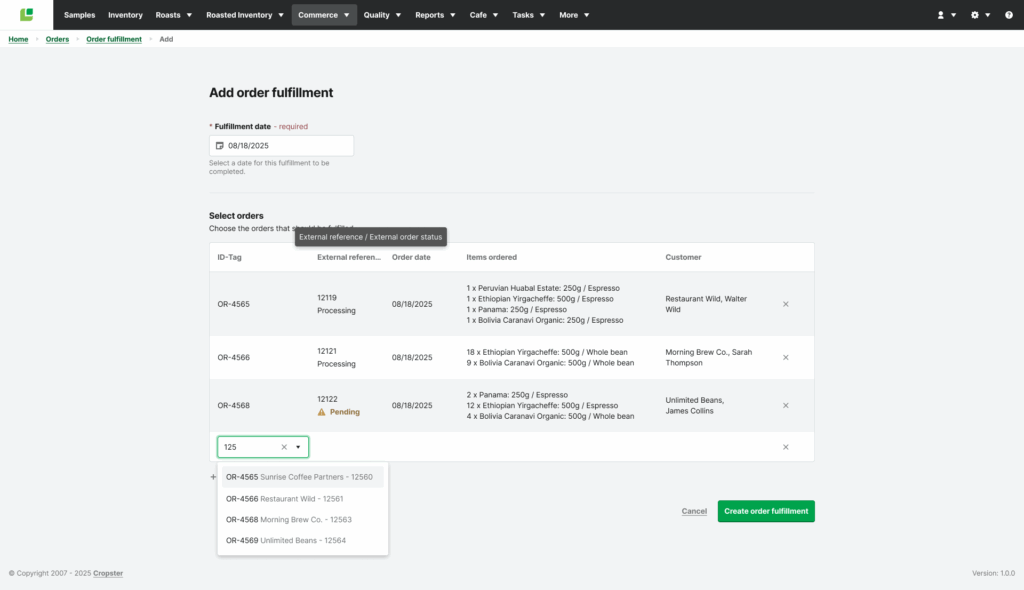
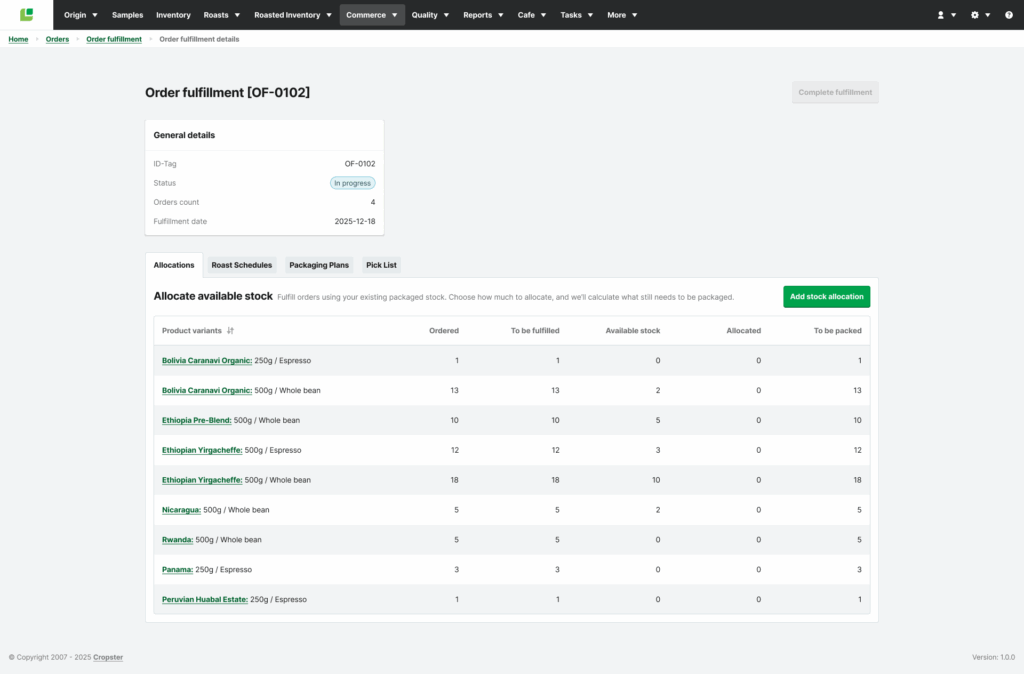
- Streamlined allocation and order fulfillment: Faster packaging & clearer stock view
- Clearer Allocation Process: We’ve updated the Order Fulfillment Details page, making it even clearer how to allocate stock, if you need to. Allocating available stock automatically updates packaging plans before you execute, making sure you don’t overpack.
- Automatic Packaging Plans: Packaging plans are now automatically created for all product variants as soon as an order fulfillment is created. This saves you a step, especially when you have no stock available, ensuring a plan is always ready. Packaging plans are updated automatically if you allocate available stock.
- New ‘Available Stock’ Column: You’ll find a new ‘Available stock’ column in the Allocations tab, showing you how much packaged stock is currently on hand.
July 15, 2025
🎉 New Features or Settings
- 35oz weight unit
- 12.07oz weight unit
✨ Improvements to Existing Features or Settings
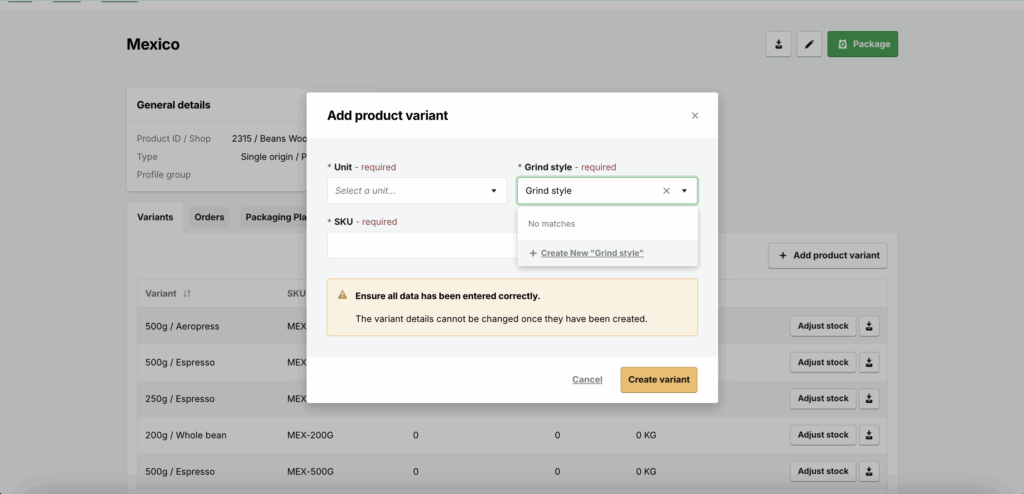
- Adding a grind style while adding a product variant
- You can now create new grind styles on the fly when you manually create your product variants. Your grind styles can always be edited in the Commerce settings.
🛠 Fixed Issues
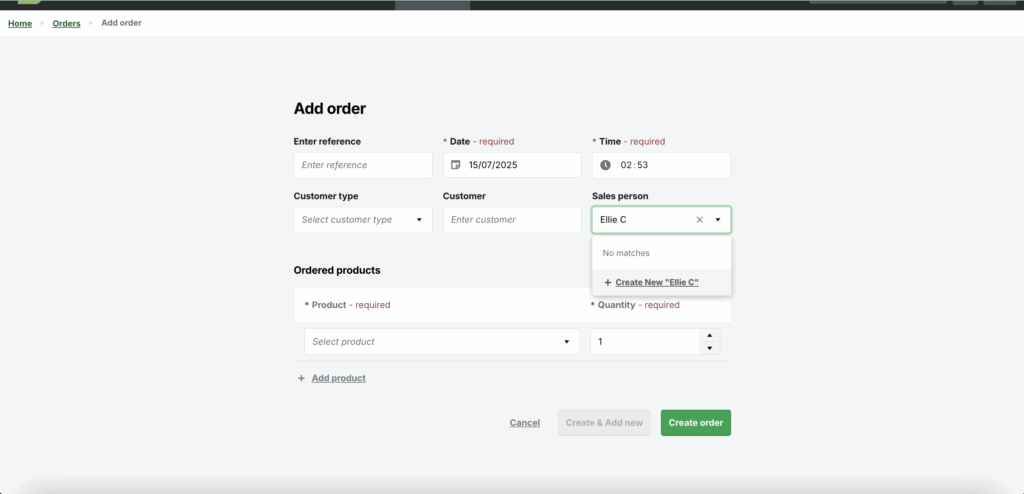
- We fixed a bug in which new sales people could not be created in accounts that didn’t have any sales people in the system already.
June 11, 2025
✨ Improvements to existing features or settings
- We’ve made improvements to the order fulfilment process to take multiple open fulfilments into account when you’re scheduling your day. Your order fulfilments will now take into account any orders and roasts that have been scheduled in other order fulfilments so that you don’t overproduce for the demand.

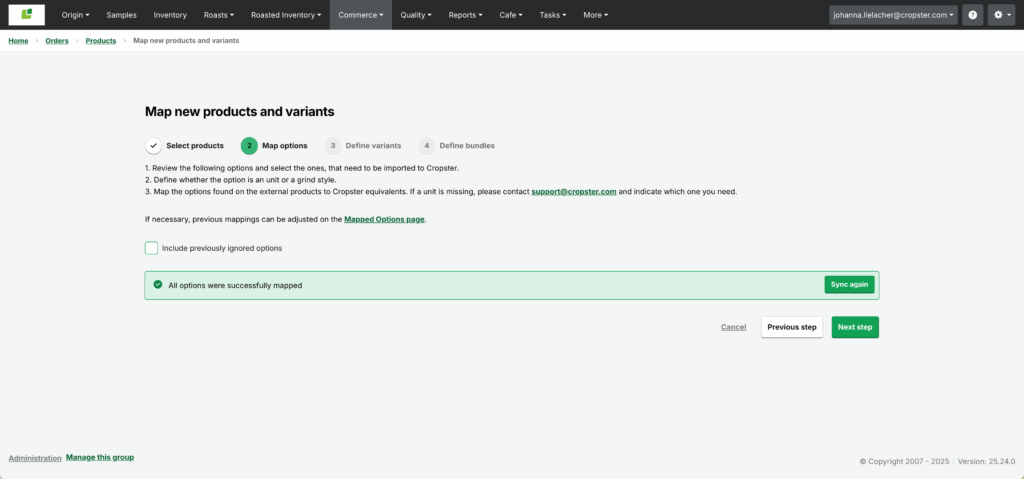
- Added a “Include previously ignored options” checkbox to Step @ of the product mapping page. Checking it loads all previously ignored options from you external store (e.g. Units, Grind Styles) so you can select and map them to their Cropster equivalents.
🛠 Fixed issues
- Dropdown selection for variants on create order page now shows all potential variants.
🗑️ Removed Features or Settings
- All legacy eCommerce features have been removed from the Roast Professional subscription. Users will now require a commerce subscription in order to access commerce related features.
- Since most of our users use the FIFO method for their packaging, we have removed the ability to manually decide which roasts get packaged.